
If you spend your day working in one of the busy IT hubs in Vijay Nagar or from a home office in Nipania, you are likely no stranger to the dull ache in your joints by evening. The rise of the software industry has brought a hidden epidemic of back pain, neck stiffness, and wrist strain. You might think this is just a normal part of the job, but it is actually a sign that your workspace is working against your body. At Dr Manisha Physiotherapy Clinic, we see many developers and data analysts who have ignored these small aches until they turned into serious conditions like cervical spondylosis or herniated discs.
Ergonomics is simply the science of fitting the workspace to the user. Instead of you forcing your body to fit a cheap plastic chair or a low laptop screen, we adjust the environment to support your natural anatomy. This guide will help you understand how to set up your desk correctly and when you should seek professional help from a specialist in Nipania.
Why IT Professionals in Indore Suffer from Unique Physical Strains
The IT culture often involves long stretches of sitting, high-pressure deadlines, and many hours spent on laptops. Unlike a desktop computer, a laptop forces you to either hunch your shoulders to see the screen or strain your wrists to reach the keys. Over months and years, this leads to what we call repetitive strain injuries. When you are focused on a complex coding problem, you often lose awareness of your posture. You might lean forward, crane your neck, or cross your legs for hours.
This prolonged static loading puts immense pressure on your spinal discs. In fact, sitting puts more pressure on your lower back than standing does. For those living in areas like Apollo DB City or Ocean Park, the transition to permanent work from home setups has often meant working from dining tables or sofas, which lack any ergonomic support. This is why the demand for Ergonomics for IT professionals Indore has grown so rapidly.
The Perfect Chair: Your Foundation for Lower Back Support
Your chair is the most important tool in your office, even more than your computer. A poor chair is the primary cause of desk job back pain. When selecting or adjusting your chair, follow these specific rules to protect your lumbar spine.
- Lumbar Support: Your lower back has a natural inward curve. Your chair must have a cushion or a built-in curve that fills this gap. If your chair is flat, you can use a rolled-up towel or a dedicated lumbar roll.
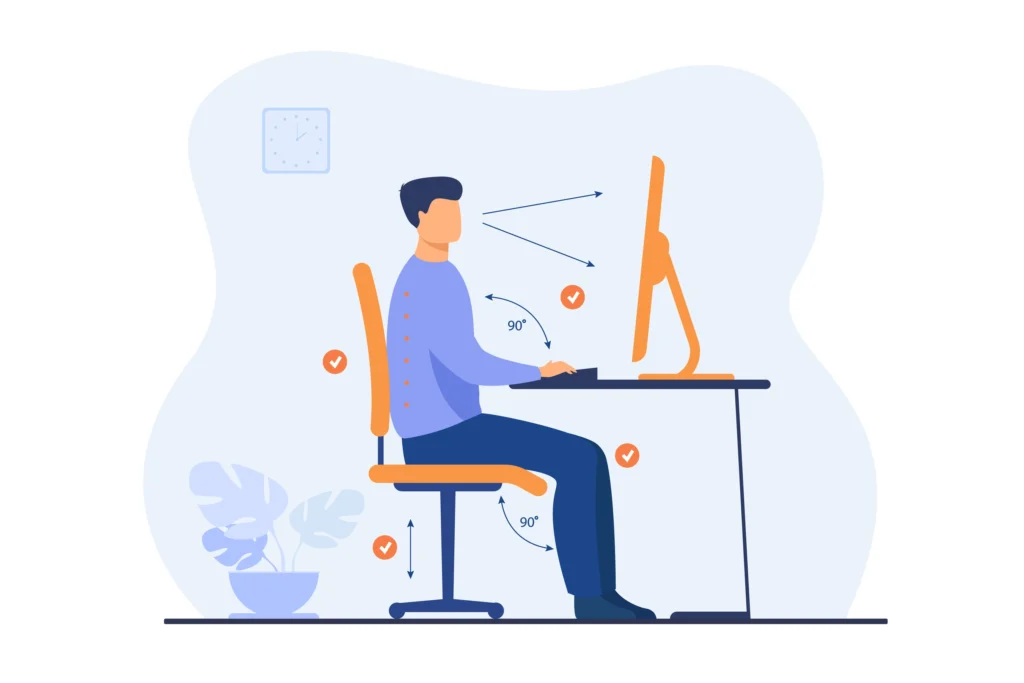
- Seat Height: Adjust the height so that your feet are flat on the floor. Your knees should be at a 90 degree angle, and your thighs should be parallel to the floor. If your feet hang, it pulls on your lower back.
- Armrest Position: Armrests should be adjusted so your shoulders are relaxed. If they are too high, your neck muscles will stay tense all day. If they are too low, you will lean to one side, misaligning your spine.
If you find that even with a good chair you still have sharp pain traveling down your leg, you may be dealing with sciatica. In such cases, specialized back pain physiotherapy in Indore is necessary to release the nerve pressure.
Monitor Placement: Ending the Cycle of Tech Neck
The position of your eyes dictates the position of your neck. If your monitor is too low, you will naturally tuck your chin and hunch your upper back. This is the primary cause of tech neck, or cervical strain. A human head weighs about 5 kilograms in a neutral position, but when tilted forward at a 45 degree angle, it puts nearly 22 kilograms of force on the neck muscles.
To fix this, the top third of your computer screen should be at eye level. If you use a laptop, you must use a laptop stand or a stack of sturdy books to raise the screen, along with an external keyboard and mouse. This setup prevents the constant downward gaze that leads to chronic headaches and neck stiffness. Many IT professionals in Nipania visit us for neck pain physiotherapy because they waited too long to raise their screens.
Wrist Health and Mouse Positioning for Software Engineers
Wrist pain is a common complaint among developers who use a mouse or trackpad for several hours. Conditions like carpal tunnel syndrome occur when the median nerve in the wrist is compressed. This often happens because the wrist is bent upward or downward while typing.
- Keep your wrists in a neutral, straight position. Do not use wrist rests that put pressure on the underside of your wrist; instead, use them to support the palm of your hand during breaks.
- Keep your mouse close to the keyboard. Reaching out to the side for the mouse puts unnecessary strain on your shoulder and rotator cuff.
- Consider a vertical mouse if you already experience tingling or numbness in your fingers. This keeps the forearm in a more natural “handshake” position.
The 20-20-20 Rule for Computer Vision Syndrome
It is not just your back that suffers; your eyes take a heavy hit as well. Computer vision syndrome causes dry eyes, blurred vision, and headaches. IT professionals in Indore often work in air-conditioned environments which can worsen eye dryness. Every 20 minutes, look at something 20 feet away for at least 20 seconds. This allows the tiny muscles in your eyes to relax and prevents the tension headaches that often mimic neck pain.
The Importance of Micro-Breaks and Movement
No matter how perfect your ergonomic setup is, the human body was not designed to stay still for eight hours. Static posture reduces blood flow to your muscles and causes your spinal discs to lose hydration. We recommend the “Pomodoro” technique or a similar timer to ensure you move every 30 to 60 minutes.
“The best posture is your next posture. Movement is the only way to keep your joints lubricated and your muscles from shortening over time.” – Dr. Manisha Mishra (Gold Medalist Physiotherapist).
During these breaks, you should perform simple stretches like shoulder rolls, neck movements, and standing hip stretches. These counter the “closed” posture of sitting and help prevent the long-term shortening of muscles.
When Ergonomics is Not Enough: Seeking Professional Help
Sometimes, the damage to the tissues is already done, and simply changing your chair will not fix the problem. If you experience any of the following symptoms, it is time to consult a specialist for Ergonomics for IT professionals Indore:
- Numbness or tingling in your hands or feet.
- Headaches that start at the base of the skull.
- Pain that wakes you up at night.
- Weakness in your grip or difficulty holding a mouse.
- A persistent ache that does not go away with rest.
At our clinic in Nipania, we provide a thorough assessment of your posture and joint health. We use evidence-based techniques like manual therapy and dry needling to release tight muscles and restore normal movement patterns. You can learn more about our approach on our about us page.
Creating a Healthy Work Culture in Indore IT Companies
If you are a team lead or a manager in an Indore-based IT firm, encouraging ergonomics can significantly reduce employee sick leave and increase productivity. Simple changes like providing adjustable monitor arms or organizing “standing meetings” can make a massive difference.
For more information on maintaining spinal health, you can organize an interactive corporate wellness seminar; contact Dr. Manisha Mishra today to schedule a professional ergonomic assessment and training session for your employees in Nipania or Vijay Nagar.
Summary of Ergonomic Setup
Setting up your workspace does not have to be expensive. It is about alignment. Your ears should be over your shoulders, your elbows should be at your sides, and your hips should be slightly higher than your knees. By making these small adjustments today, you are preventing years of chronic pain and potential surgery in the future.
Frequently Asked Questions
1. Can a standing desk solve all my back pain issues?
While standing desks are helpful, standing for eight hours straight is also bad for your health. The key is to switch between sitting and standing every hour. Overuse of a standing desk can lead to varicose veins and foot pain.
2. Why does my neck hurt even though I have an expensive chair?
Your chair supports your back, but your neck is controlled by your monitor height. If your screen is too low, you will still suffer from neck pain regardless of how good your chair is.
3. Is it okay to work from my bed or sofa occasionally?
Working from a sofa causes your spine to “C-curve,” putting maximum pressure on your discs. While okay for 15 minutes, it should never be your primary workspace. If you must, use a laptop desk and a firm cushion behind your back.
4. How often should I see a physiotherapist for desk-related pain?
If you have persistent pain, an initial assessment and a few follow-up sessions can help correct your posture. After that, a check-up every few months can help ensure you are maintaining your joint health.
5. What is the best type of mouse for wrist pain?
A vertical mouse or a trackball mouse is often better for carpal tunnel or wrist strain because it prevents the twisting of the forearm bones.
6. Does blue light blocking glasses help with ergonomics?
While they may reduce eye strain for some, they do not fix the physical posture of your neck. Focus first on the 20-20-20 rule and monitor positioning.
7. How do I know if my chair has enough lumbar support?
When you sit back, you should feel a gentle pressure against the small of your back. There should be no gap between your spine and the chair at the waist level.
8. Are exercise balls good replacements for office chairs?
They can be used for 20 minutes to engage your core, but they lack back support and can actually cause more fatigue and poor posture if used for the whole day.
9. Can physiotherapy help with headaches caused by computer use?
Yes, many computer-related headaches are “cervicogenic,” meaning they start in the neck. Physiotherapy can release the tension in the upper neck muscles to stop the headaches.
10. What is the single most important ergonomic change I can make?
Raising your monitor to eye level is usually the change that provides the most immediate relief for the highest number of IT professionals.
Medical Disclaimer: This information is for educational purposes only and does not replace professional medical advice. Always consult with a qualified healthcare provider or a physiotherapist before starting a new exercise routine or if you are experiencing severe or chronic pain.